










Use WhatsApp
In Your CRM
In Less Than 60s

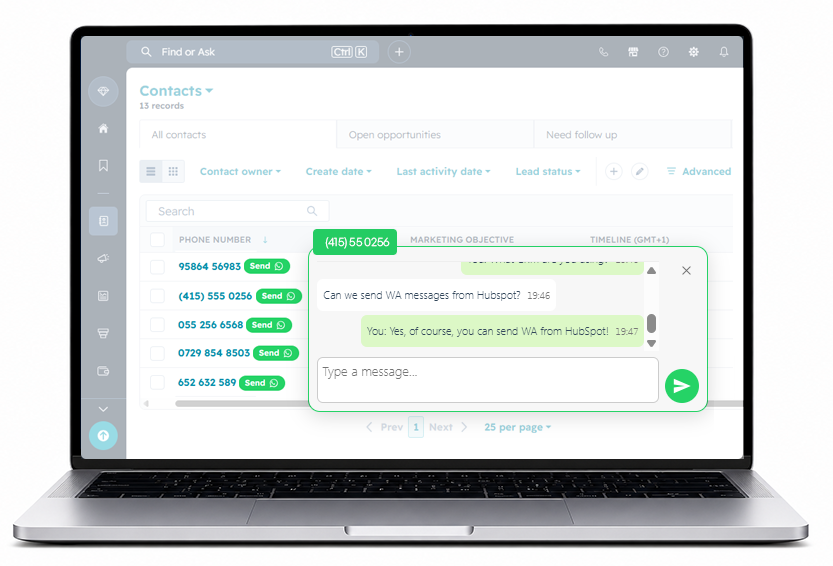
  • Send Whatsapp from any Website or CRM.
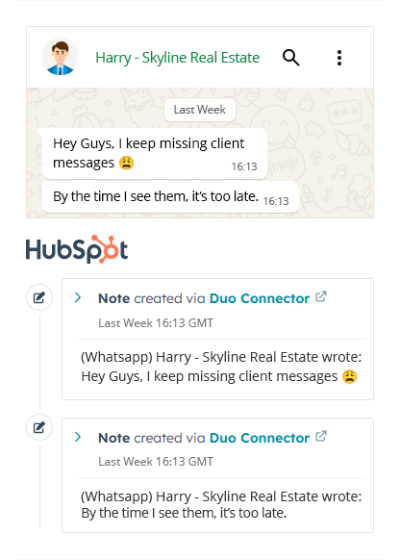
  • Sync Whatsapp conversations to HubSpot.
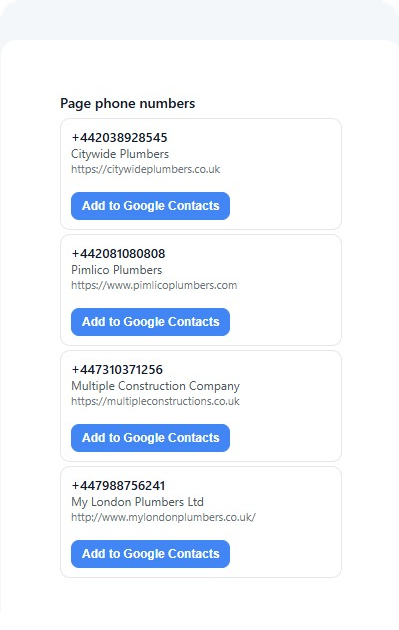
  • Save CRM contacts directly to your phone.

Beta Release Date 31 Aug

How Does It Work?

01

Open Free Account

Open your free Duo Connector account in seconds and start your 30-day free trial with access to every feature. Send WhatsApp messages from any website or CRM, sync conversations to HubSpot, and save CRM contacts directly to your phone—all without any WhatsApp API integration.

There are no credit card details, no contracts, no hidden charges, no Meta Business verification, and no technical setup required. Simply open your account, install the extension, connect your existing WhatsApp account, and you’ll be sending messages in less than 60 seconds.

02

Install the Chrome Extension


Install the Duo Connector Chrome extension in just a few seconds and watch a “Send WhatsApp” button instantly appear next to ANY mobile phone number on ANY websites. Whether you’re browsing a CRM, Google Maps, a company website, or an online directory, you can start a WhatsApp conversation with a single click—no copying phone numbers, no switching between applications, and no interrupting your workflow.

Unlike traditional WhatsApp solutions, there’s no integration required with your CRM or the websites you use. Simply install the extension and Duo Connector works automatically wherever phone numbers are displayed. No WhatsApp API integration, no developers, no complicated setup—just install it and start messaging in seconds.

03

Log In With Your WhatsApp Number

Open WhatsApp Web in Google Chrome and log in with the same WhatsApp phone number you already use every day. If you’re already signed in, there’s nothing else to do. If not, simply scan the QR code with your phone and Duo Connector will be ready to use in just a few seconds.

Instead of going through a complicated integration process, there’s no WhatsApp API integration, no new WhatsApp number, no Meta Business account, and no business verification process. Keep using your existing WhatsApp account exactly as you do today while unlocking every Duo Connector feature across any website or CRM.

04

Send WhatsApp Messages from Any Page


Now simply click the Send WhatsApp button next to ANY phone number or open the floating chat widget to start a conversation instantly. Reply to messages, continue existing chats, or start new conversations without ever leaving the page you’re working on.

Keep your conversations open in the floating chat widget while you continue browsing, updating your CRM, or researching new prospects. Switch seamlessly between multiple conversations without opening new WhatsApp tabs or losing your place. Every message is automatically delivered to the correct WhatsApp conversation, allowing you to communicate with several customers at the same time while staying focused on your work.

Save All WhatsApp Conversations to HubSpot

icon-up
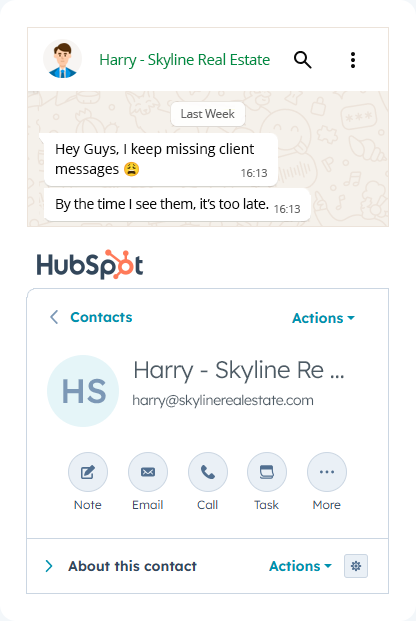
Every message, automatically synced

Your WhatsApp communication is saved directly to HubSpot as client interactions — no manual work required.

icon-down
Build complete client histories effortlessly

Create a central hub of every conversation so your team can collaborate, review, and act with full visibility.

Beta Release Date 31 Aug

Save New Contacts from Google Straight to HubSpot

icon-up
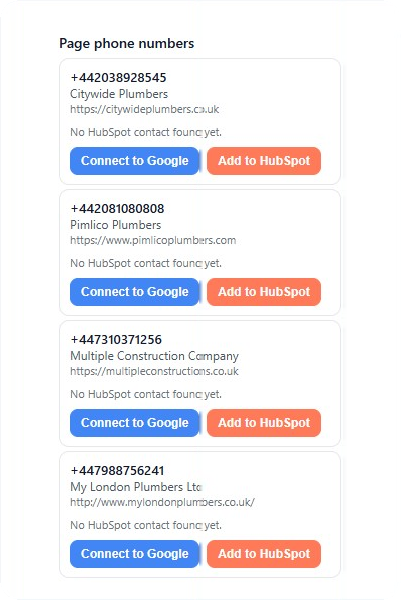
Save new businesses to HubSpot

Capture business details from Google Places with a single click and automatically create new HubSpot contacts in seconds.

icon-down
Prospect faster with less admin

Eliminate manual data entry and keep your CRM up to date as you work, so every potential customer is ready for follow-ups, calls, and WhatsApp messages.

Beta Release Date 31 Aug

Save New Contacts from Google or CRMs to Google Contacts

icon-up
One click to save every new contact

Instantly save businesses and customers from Google or your CRM directly to Google Contacts, including their name, phone number, website, and other available details.

icon-down
Always have the right contact in your pocket

Your contacts automatically sync across all your devices, making it easy to call, text, or message customers wherever you are—without entering the same details twice.

Beta Release Date 31 Aug

Access Clients in HubSpot (One Click Away)

icon-up
Open client profiles directly from WhatsApp

Each client name in the chat view links to their HubSpot record. Just click to open their deal, notes, and timeline in a new tab.

icon-down
Stay in flow, without switching tools

Move from WhatsApp to HubSpot seamlessly — no searching, no wasted time, just instant access to your client’s full context.

Beta Release Date 31 Aug

Highlight Replied vs. No-Reply Chats

icon-up
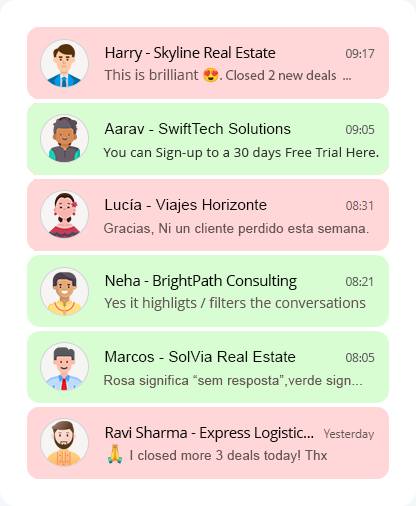
Instantly see who’s waiting for your reply

DuoConnector highlights every chat — green for replied, pink for pending — giving you a live view of what needs attention.

icon-down
Stay organized and never miss a client again

No more scrolling or guessing who you’ve replied to. Every conversation status is visible, keeping you confidently on top of your inbox.

Beta Release Date 31 Aug

Pro Account

$9.73 /per month
  • Send Unlimited WhatsApp Messages
  • Sync Unlimited Messages to HubSpot
  • Save Any Contact in HubSpot
  • Save Any Contact to Your Mobile Phone
  • Open HubSpot Contacts from Any Page
  • See No Replies in WhatsApp
  • Snooze Received Messages in WhatsApp
  • Track WhatsApp Conversations
  • Privacy Mode (Blur) in WhatsApp

Be the first to know when Pro access becomes available.

Beta Release Date 24 Aug